

If you. already have the Ring Door Bell MQTT Plugin installed that is saving any. motion to your Media Files you may have noticed that it becomes a bit cramped now with Ring and a paid subscription you have access to these files for 30 days. Then they are deleted. In Home Assistant you can ensure that you keep them for a longer period of you choosing.
How about you remove that subscription fee.
You can keep the files as long as you like. Finding a simple plugin that will clean your folders has not been easy. So I. have created a little script within HACS that will allow you to set within the Home Assistant OS how long to keep the Videos all within the GUI.
Visit https://github.com/LPR-Labs/homeassistant-media-cleanup for further details
Step 1
Visit https://github.com/LPR-Labs/homeassistant-media-cleanup for further details. We assume you already have HACS Setup.
Step 2
If so click HACS from the Menu Bar.

Step 3
We need to add our Repository to the Allowed list within HACS
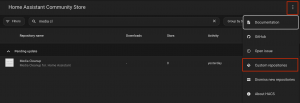
Once you open HACS Click the three Dots and then Custom Repositories.
Step 4
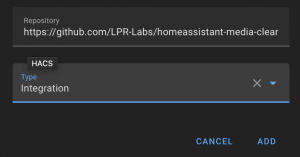
Use the Web Address of
https://github.com/LPR-Labs/homeassistant-media-cleanup
and c choose the type “Integration”
Step 5
Once installed this repository you will need to restart Home Assistant. Click Developer Tools from the Left Hand Menu Bar. Then Click Restart at the top of the page.
Step 6
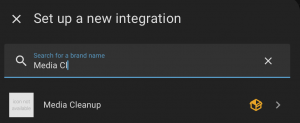
Once your Home Assistant has restart click Settings > Devices and Services > Add Integration (Bottom Right Hand Side)
Search For Media Cleanup and Click on Media Cleanup
Step 7
A Prompt Window Should appear similar to below.
Input your chosen folders. If you have your files saved to your main media folder this can be done by typing /media/ in the folders field.
In my example I have multiple Cameras. One saves footage in the folder “FrontDoor” and Another in “Landing” so within my media folder I have a folder called frontdoor and another called landing. For this I would choose
/media/frontdoor/
and
/media/landing
for the application my full folder path would be /media/frontdoor/, /media/landing/
This shows both Folders for this setup. I would then choose how many days I want to from now delete the content.. This is set to 7 as standard. I could change this to 30. This would mean that any content that is older than 30 days would bee deleted.
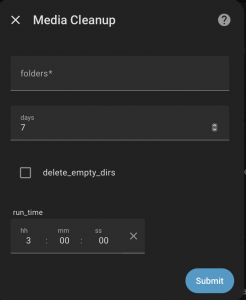
You also have the option to delete Empty Directories.
The run_time field is the time you wish this script to run. I would advise setting this to 00:00 or 01:00. This script will then delete content at this time which is longer than the days set.
So in the example above. All Folders I have inputed would delete all content older than 7 days each day at 03:00.
If you have any issues with this please email admin@lprlabs.dev or raise an issue on GitHub.